8 min read
How I Capture Every Thought with a Ring
Six weeks with the Pebble Index 01: 129 voice notes straight into my Obsidian daily note, and a self-hosted AI agent I can ask from my finger.
Just before 3 am on 2 October I pressed the ring on my finger and said I should write an article about it. A few minutes later the thought was in my daily note.
If you’ve got the ring and you’re stuck getting the notes into your daily note, this is how I do it. The code is on GitHub.
Why a ring
Most of my ideas don’t come at a keyboard. They come when I’m walking around town, by the river, in a shop. By the time I’ve got the phone out, unlocked it, found the app and typed, the thought is gone, or I’ve decided it isn’t worth it.
The Pebble Index 01 is made by Core Devices, the company Eric Migicovsky started to bring Pebble back. One button and a microphone. No screen, no speaker, no vibration, no charging: the battery lasts years, then you send the ring back for recycling. It only records while you hold the button, so there’s no wake word, nothing to confirm, and the other hand stays free. It’s $75 for now, and Pebble says the price will go up to $99. Prices are in dollars and the ring ships from Asia, so UK buyers pay shipping and tax on top.
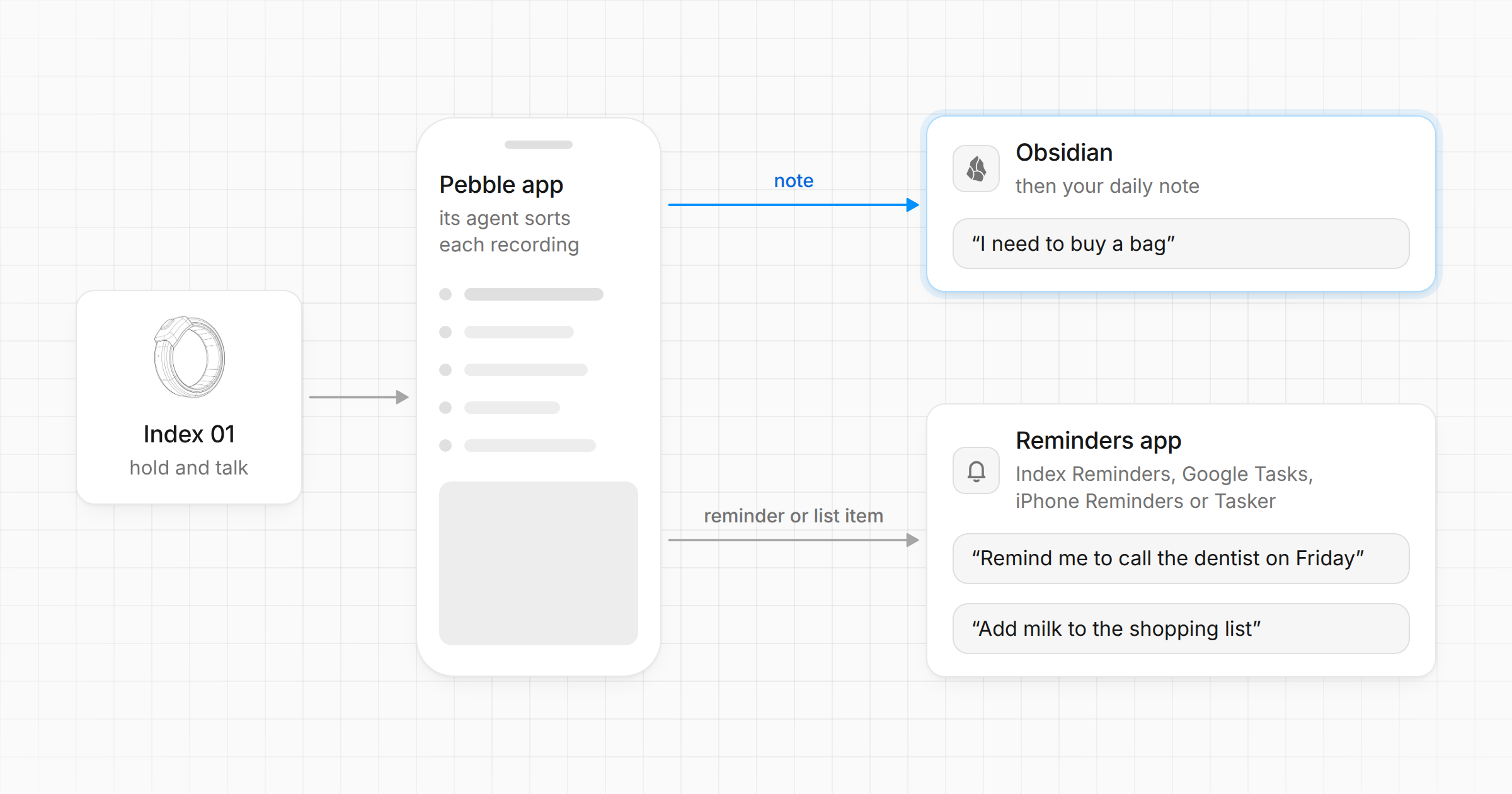
The Pebble app on the phone transcribes each recording and sends it where you tell it, separately for each gesture. I use two:
- Hold and talk: a note to myself. It lands in today’s daily note.
- Double-click, then hold and talk: a question for my AI agent. The answer comes back on Telegram.
Hold and talk goes through the app’s own agent, which decides what each recording is, and only notes go to Obsidian. “Remind me to call the dentist on Friday” becomes a reminder in the reminders app you pick (the app’s own Index Reminders, Google Tasks, iPhone Reminders or Tasker), and “add milk to the shopping list” goes on a list there, so neither reaches the daily note. Leave “Any unclear requests become a” on Note, or whatever the agent can’t place skips your vault too. When I said “I need to buy…”, it came through as a note, and triage moved it to my shopping list.
What I record
Mostly small things: a restaurant to try, a museum to visit, a chore, a question to look up later, the odd business idea. Each idea gets one cheap check before it earns a proper note.
In the first six weeks I recorded 129 notes, on 26 of 45 days, so the ring didn’t end up in a drawer. Half of them are nine words or fewer: it’s for the thought you’d otherwise lose, not for dictation.
What goes wrong
Names. With the app’s “Cloud, with local fallback” transcription, normal sentences come out fine, Italian ones too. Names don’t: Bloomberg became “Bungberg”, Slashdot became “Slushdots”, and the app can’t take a list of custom words yet (a pull request that adds one is still open). I don’t fix them on the spot: whatever processes the notes later works out what I meant from context.
Junk. About one note in six: tests from the first days, retries after a mangled word, and accidental presses that caught “And.” or half of somebody else’s sentence. It costs nothing: it stays in the daily note and nothing downstream picks it up.
The agent is the gesture I use least. 15 questions against 129 notes. The AI part is what gets the attention; the part I actually use is the boring one. The ring has no speaker, so every answer means getting the phone out, which is exactly what the ring is there to save me from. A note doesn’t need an answer.
How it’s wired
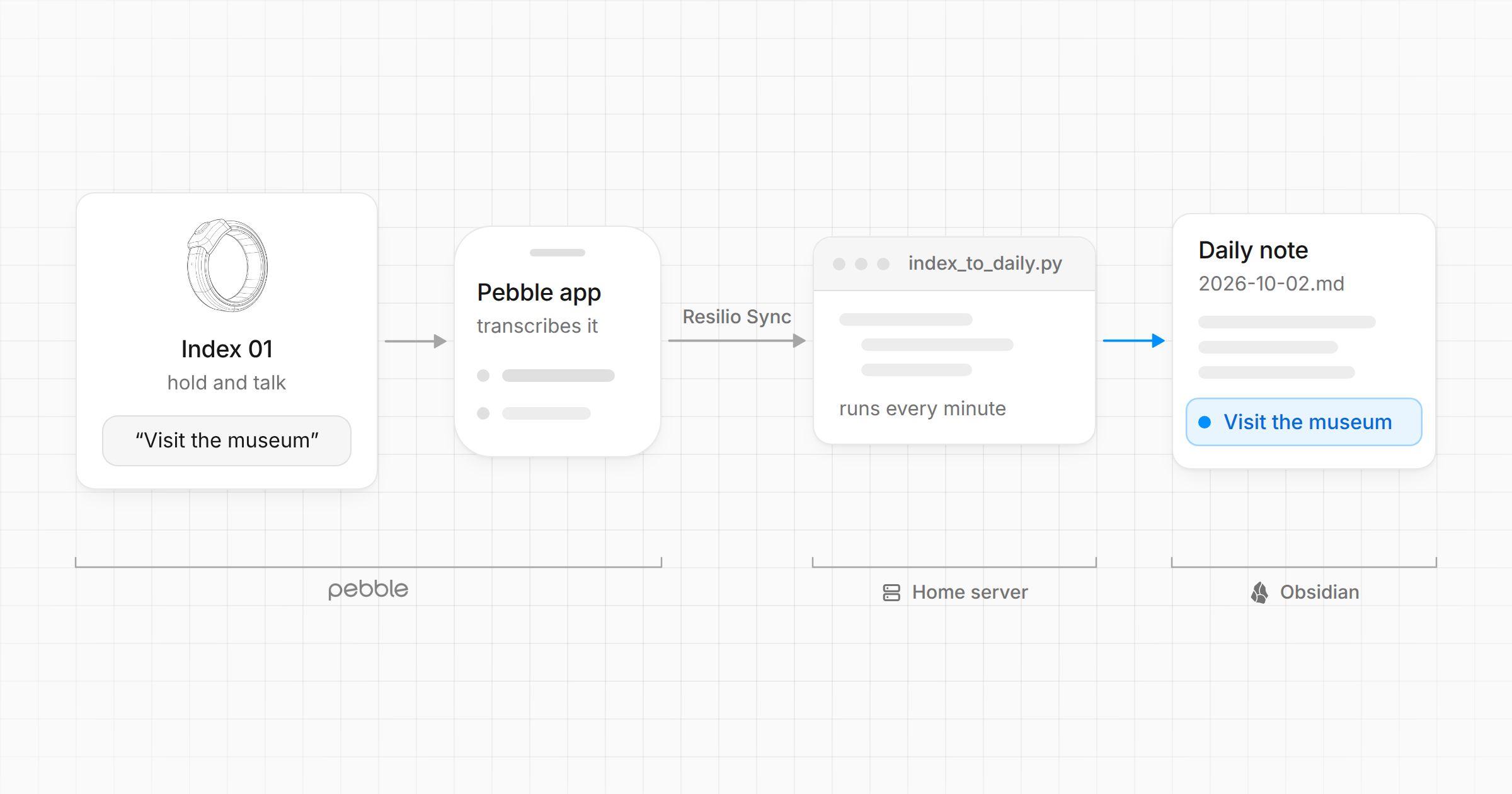
Short version: the phone writes a file into my vault, sync carries it to a small computer at home, and a script moves it into the daily note. After the app, there’s no AI in that path. If a program can do the job, I have AI write the program instead of doing the job itself: next time it runs it costs no tokens, and it does the same thing every time.
Notes into the daily note
The Pebble app has an Obsidian integration: you pick the vault folder on the phone and it writes Markdown straight into it. Three modes: append everything to one note called “Pebble Index”, append to a note you choose, or one file per recording. None of them knows about daily notes, and the daily note is the one place I look every day. So I let the app write one file per recording into Voice notes/ and fix it downstream. A recording at 14:15 on 2 October arrives as Voice notes/2026-10-02 1415.md:
---
created: 2026-10-02T14:15
tags: [index]
---

Visit the museum.
My vault already syncs between my Pixel, my PC, a NAS and a Lenovo ThinkCentre M720q, a tiny PC I use as a home server, with Resilio Sync. On the ThinkCentre, a systemd timer runs index_to_daily.py every minute:
- It picks up capture files tagged
indexthat are at least 90 seconds old, so sync has finished writing them. - It appends the transcript as a plain paragraph to the daily note for the date in
created, hereDaily notes/2026-10-02.md, and creates the note if it isn’t there yet. - It moves the capture into Obsidian’s
.trashfolder, so nothing is lost for good.
Two details mattered more than I expected. If the daily note changed in the last 60 seconds, the script waits: I might be typing in it on another device, and a sync conflict is worse than a minute’s delay. And it remembers what it has appended, so a failed move never adds the same note twice.
Both waits come down to a file’s modification time, and whatever isn’t ready is left for the next run, a minute later. Simplified:
SETTLE_SECONDS = 90  # capture file must be this old (Resilio may still be writing)
QUIET_SECONDS = 60  # daily note must be untouched this long (someone may be editing)

for path in sorted(voice.glob("*.md")):
    if now - path.stat().st_mtime < SETTLE_SECONDS:
        continue
    ...
    daily = daily_dir / f"{day}.md"  # day: the date in created
    if daily.exists() and now - daily.stat().st_mtime < QUIET_SECONDS:
        continue
It’s 193 lines of standard-library Python, with tests. A note usually shows up within three minutes of the phone syncing.
Without a home server
You don’t need one. The script runs on any computer that has your vault, so a laptop works: schedule it every minute, and notes land in the daily note whenever the laptop is on. To skip the computer as well, Pebble Index Sync is an Obsidian plugin that moves entries from the app’s “Pebble Index” note into your daily notes each time Obsidian starts, phone included. I haven’t tried it, and it isn’t in Obsidian’s plugin store yet, so you’d have to build it yourself. If you can live without the daily note, you need neither: set the app to append to a note you choose, such as your inbox, and each recording lands there under its date and time.
Questions to the agent
OpenClaw is Peter Steinberger’s open-source personal agent. Mine runs on the same ThinkCentre and talks to me on Telegram. It runs as its own Linux user, with my vault mounted read-only apart from one folder of its own.
The Pebble app can call a webhook for each recording, set per gesture. It sends multipart form data with the gesture in an X-Index-Trigger header; OpenClaw’s hooks only take JSON. So a second small script, pebble_hook.py (226 lines), sits in the middle. It checks a bearer token, ignores every gesture except double-click-and-hold (plus the app’s “Send test event” button), and forwards the transcript to an OpenClaw hook that runs it in my usual Telegram chat with the agent. Same chat, so follow-ups keep their context. OpenClaw also asks me one question about my life every morning, and an answer spoken into the ring lands right under it.
What the app sends, without its recordedAt and client fields:
POST /index
Authorization: Bearer <token>
X-Index-Trigger: double-click-hold
Content-Type: multipart/form-data; boundary=x

--x
Content-Disposition: form-data; name="transcription"

Is the museum open on Mondays?
--x--
What the bridge sends on. The line in front of the transcript tells the agent where the message came from and how to answer:
POST /hooks/ring
Authorization: Bearer <OpenClaw's hook token>
Content-Type: application/json
Idempotency-Key: <X-Index-Delivery from the app>

{
  "message": "Voice message from the Pebble Index ring (double-click-hold): a question, or an answer to today's daily question. Reply briefly, as a Telegram message:\n\nIs the museum open on Mondays?"
}
The webhook is only reachable inside my Tailscale network, the private network between my devices. No public URL, and my phone is always connected to it. If a call fails anyway, the app doesn’t queue it: it only tries again on the next recording.
I didn’t use the app’s MCP support: with MCP, Pebble’s own model reads what I said and picks a tool to call. The webhook hands my words straight to my agent. MCP has also shifted since I set this up: version 1.15 of the app dropped MCP groups, so a gesture can no longer have its own set of tools, and Eric Migicovsky wrote: “We’ll be recommending switching to plugins rather than MCPs.”
One warning if you copy this: the token is the only thing between the webhook and an agent that can run commands on your box. Keep it inside Tailscale, and never put it on the public internet with Funnel. For a second lock, turn on request signing for the gesture in the app and set the same secret as PEBBLE_HOOK_SECRET on the bridge: it then refuses unsigned requests, timestamps more than five minutes off, and deliveries it has already seen.
Processing the notes
Every few days I run two Claude Code skills on the vault. The first reads the daily notes I haven’t processed yet and pulls anything worth keeping into an inbox note. The second walks me through the inbox one item at a time and sends each one home: my to-do list, a list of places to go, my ideas note, the note about the city, or the bin. That’s where “Bungberg” went back to being Bloomberg. Since the ring arrived I’ve processed notes on 10 different days.
That’s the real cost of the ring. Capture is now almost free, so the time goes into triage instead. Changing my mobile provider went in twice, nearly two weeks apart. My rule for that: when something gets captured twice, deal with it that day instead of filing it again.
Links take a different road. I save those to Raindrop, and a third skill goes through them ten at a time and proposes keep, delete or save to Obsidian.
Why not Amazon’s Bee
Amazon launched the Bee Frontier on 15 October: $74.99 on Amazon.com, on your wrist or clipped on, and built to remember your conversations. The purchase gets you summaries and 14 days of memory; connecting it to other apps needs Bee Pro at $11.99 a month. For me the ring wins three times: it only records when I hold the button, what I say ends up as plain text in my own vault, and there’s no subscription. I won’t pay monthly for a gadget: I buy a thing once.
What it costs
The ring: £65.75 at preorder with shipping, $18.85 of tax when it shipped and £8.50 for a sizing kit (you can print your own), so about £88 in all. Then a new one when its battery runs out. Everything else runs on stuff I already own or pay for: the ThinkCentre, Resilio Sync, Tailscale, Claude Code, and my ChatGPT Plus subscription, which is what OpenClaw uses for its model.
The code
Both scripts, their systemd units, the tests and the OpenClaw hook config: github.com/rbartoli/pebble-index.
index_to_daily.py assumes my layout: captures in Voice notes/, one Daily notes/YYYY-MM-DD.md per day, and my own frontmatter on any daily note it creates. If your vault differs, change the folder names and DAILY_STUB in the script first. --dry-run shows what it would do without changing anything.
Next
Two improvements came in through the ring itself: a gesture that saves my GPS position with the note, for notes about a place, and matching each note’s time against my Garmin runs.